
Preparing to Uninstall Sip Subscriptions.
We’re sorry to see you go! To ensure your store remains organized and your customers aren't left with "orphaned" records in Shopify, there is one critical step you must take before removing the app.
The Golden Rule: Cancel First
You must manually cancel all active subscriptions before uninstalling the Sip Subscriptions app.
Follow these steps to clear your active contracts before uninstallation:
- Open the Sip Subscriptions app from your Shopify admin.
-
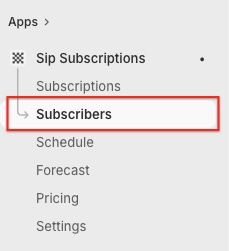
Navigate to the Subscribers section in the sidebar.
- Locate the subscription you wish to end.
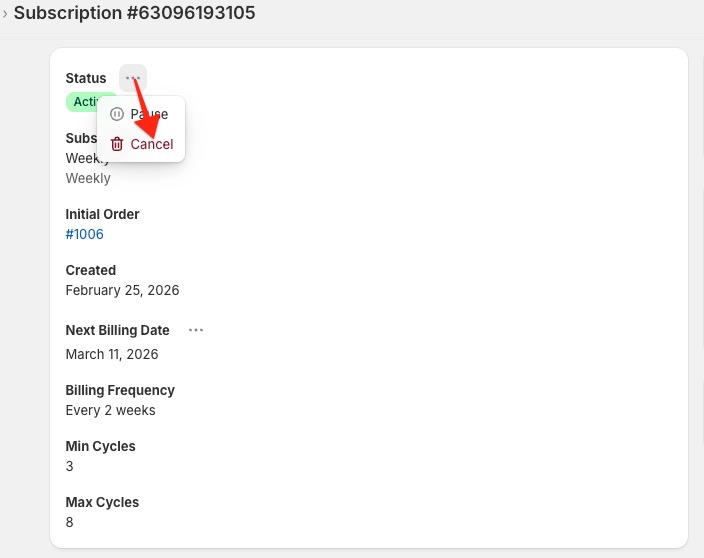
- Click the three dots (...) located next to the Status badge.
-
Select Cancel from the dropdown menu.
- Repeat this for all subscribers listed as Active or Paused.
Already uninstalled?
If you already removed the app without cancelling your subscriptions, don’t worry! Simply reinstall Sip Subscriptions, follow the cancellation process above, and then proceed with the final uninstallation.
Final Steps for Uninstallation
Once your Active Subscribers count on the dashboard reaches 0, you can safely proceed:
- Go to Shopify Admin > Settings > Apps
- Find Sip Subscriptions in the list.
- Click Uninstall.