
How Does Sip Handle Failed Subscription Payments?
Sip Subscriptions automatically retries failed subscription payments to help you recover revenue and keep customer subscriptions active with minimal manual effort.
Why Do Subscription Payments Fail?
Subscription payments can fail for a variety of reasons, including:
- Expired or replaced credit cards
- Insufficient funds
- Temporary bank or network issues
These situations are common and often resolved simply by retrying the payment or allowing the customer time to update their payment method.
How Billing Retry Management Works in Sip
When a subscription payment fails, Sip’s billing retry management takes over based on the settings configured in your dashboard.
Here’s how it works:
Automatic Retries
If a payment attempt fails, Sip will retry the charge automatically according to your configured retry rules. The subscription remains active during this process.
Failed Payment Notifications
When failed payment notifications are enabled, both you and your customer are notified as soon as a payment fails — giving customers a chance to update their payment details before retries are exhausted.
Customizable Retry Settings
You can control:
- Maximum number of payment attempts
- Days between retry attempts
- What happens if all attempts fail (e.g. pause the subscription)
Successful Retry
If a retry attempt succeeds:
- The payment is captured
- A subscription order is created automatically
- No further retries are made for that billing cycle
If All Attempts Fail
If all retry attempts fail:
- The configured action is applied (for example, pause subscription)
- The subscription will not renew again until the customer updates their payment method and resumes it
All failed attempts and retry outcomes are logged and visible in the app.
Example
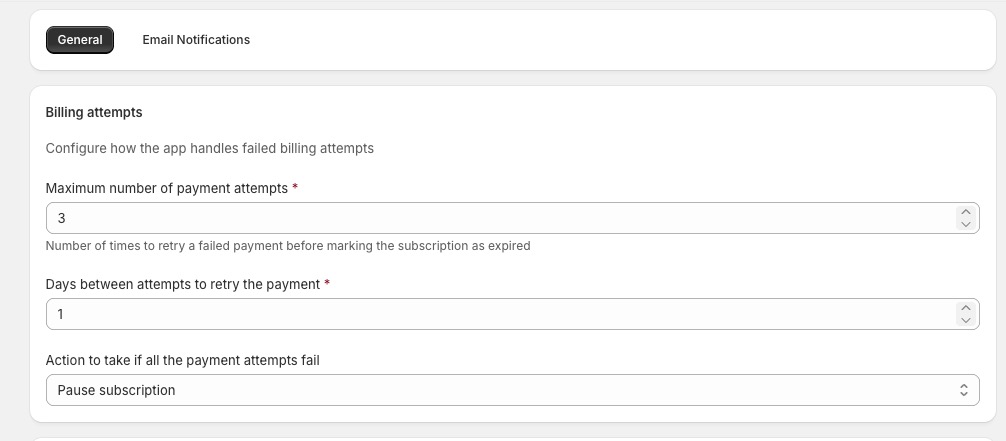
If your settings are configured as follows:
- Maximum payment attempts: 3
- Days between attempts: 1
- Action after failure: Pause subscription
Sip will:
- Attempt the initial payment
- Retry once per day for up to 3 total attempts
- If one of the retries succeeds, an order is created and retries stop
- If all retries fail, the subscription is automatically paused
How to Configure Billing Retry Settings in Sip
To manage these settings:
- Open the Sip Subscriptions app
- Go to Settings > General
-
Scroll to the Billing attempts section
Configure:
- Maximum number of payment attempts
- Days between retry attempts
- Action to take if all attempts fail
- Click Save
Remember: Turning on failed payment email notifications can greatly improve recovery rates by encouraging customers to update their payment details promptly.
If you have questions about billing retries or need help choosing the right settings, feel free to reach out — we’re always happy to help!