
Configuring General Settings
Sip Subscriptions gives you flexible control over how subscriptions are billed, processed, and managed—both by you and your customers. This guide walks through the General Settings available in the Sip dashboard and explains how each option shapes your store’s subscription experience.
To access these settings, navigate to Settings > General from the sidebar.

Billing Attempts (Dunning)
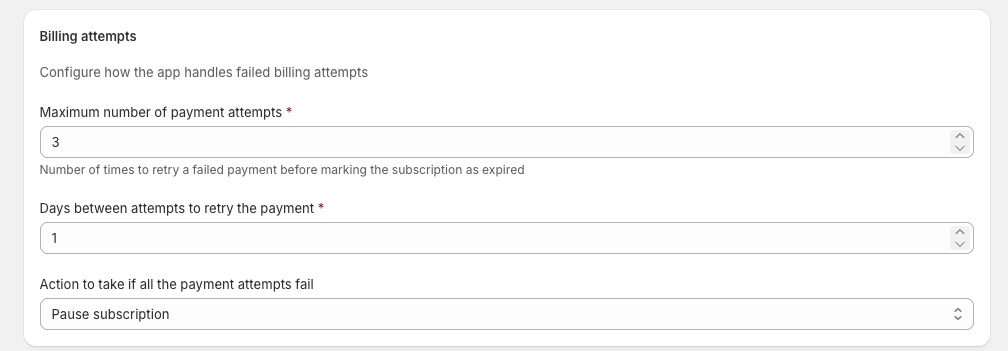
These settings determine how Sip handles failed payment attempts (e.g., expired cards or insufficient funds) to help you recover revenue automatically.
- Maximum Number of Payment Attempts
- Range: 1–10 (Default: 3)
-
Sip will retry a failed payment up to this many times before taking further action.
Days Between Retry Attempts
- Range: 1–7 days (Default: 1)
-
This defines the waiting period between each retry. For example, if set to 1 day, Sip will retry once every 24 hours until the maximum attempt limit is reached.
Action When All Attempts Fail Define the final status of a subscription if payment cannot be recovered:
- Skip order: Skips the current billing cycle and attempts the next scheduled one.
- Pause subscription: (Recommended) Temporarily halts the subscription. The customer must update their payment method to resume.
-
Cancel subscription: Permanently ends the subscription contract.
Order Processing
Control the timing of your subscription charges to better manage your fulfillment workflow.
- Process Immediately (Default) Orders are charged and created as soon as they are due. This is ideal for stores that prioritize fast fulfillment.
- Specific Time of Day Choose a specific hour (e.g., 9:00 AM) in your store’s timezone for all daily renewals.
Benefit: This creates a predictable "lock-in" time, giving customers a clear window to make last-minute changes to their upcoming order before the charge is processed.

Customer Subscription Delay Options
Empower your customers with self-service tools in the Customer Portal. Offering flexibility is a proven way to reduce churn and prevent cancellations.
| Option | Description |
| Skip next billing cycle | Allows customers to bypass their very next order while keeping the rest of their schedule intact. |
| Temporarily pause | Customers can choose to pause for a set duration. You can enable any combination of 1, 2, 3, or 4 weeks. |
| Pause indefinitely | The subscription enters a "Paused" state until the customer manually clicks "Resume." |
Need Help?
If you have questions about which settings are right for your business model—or need assistance configuring your dunning schedule—reach out to us directly via the in-app support chat. We’re here to help you grow your recurring revenue!